
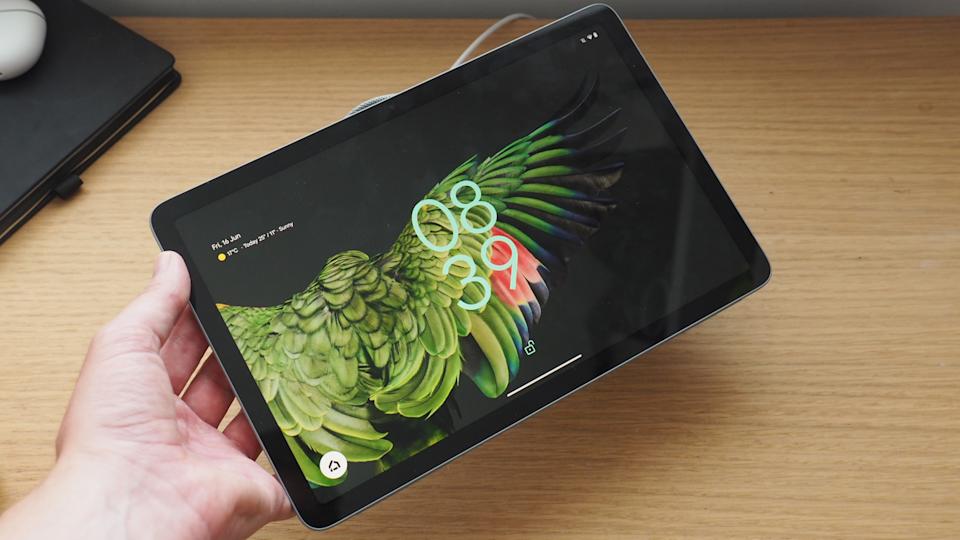
one of the best android tablets out there , is getting (a most needed) Android 16 update
Why the Google Pixel Tablet Is One of the Best — and Why Android 16 Makes It Even Better
Tablets have long sat in a weird middle ground — more powerful and flexible than a phone, but not quite as “work-ready” as a laptop. Google’s Pixel Tablet already did a lot of things right. But now, with the rollout of Android 16, it’s about to become even more compelling. Here’s why this update is a big deal — and why this tablet deserves a second look.
What Makes the Pixel Tablet Great in the First Place
Elegant Design + Google’s Ecosystem
The Pixel Tablet combines Google’s clean hardware design with deep integration into its services — Google Assistant, Google Home, and more. It works beautifully whether docked or handheld.
Decent Performance
While it’s not pushing gaming-laptop benchmarks, the Pixel Tablet has enough horsepower for productivity, media consumption, and multitasking. For many, it’s the sweet spot: powerful but not power-hungry.
Long-Term Support
Google’s commitment to updates is one of the big draws. And now, that commitment is being proven again.Android 16: The Update We’ve Been Waiting For
Android 16 brought a number of features — but some of the most meaningful are tailored for larger devices like tablets.
Desktop-Style Windowing
Google introduced a “desktop windowing” system, letting you open, move, and resize app windows — not just split-screen, but real multiple-window multitasking. That’s huge for productivity.
Improved Keyboard Shortcuts & Taskbar Overflow
To go along with windowed apps, Android 16 supports customizable keyboard shortcuts and a taskbar overflow — so when too many apps are open, you can access them easily.
Desktop Windowing Built With Samsung
Interestingly, Google worked with Samsung to develop this windowing experience for large screen devices, underscoring how serious Android 16 is about tablets being more than just big phones.
Stronger Security
Android 16 introduces Advanced Protection, Google’s strongest mobile device protection, securing you from malicious apps, scam calls, and more.
Lock-Screen Widgets
One of the more interesting UI touches: Android 16 is expanding lock-screen widgets (already on the Pixel Tablet) to more devices.
Quarterly Platform Releases (QPRs)
Google isn’t just delivering one big update. With QPRs (Quarterly Platform Releases), the Pixel Tablet will get more frequent improvements, bug fixes, and features.
The Update Is Already Here (Or Coming Soon)
Android 16’s rollout began in June 2025.
According to Google’s developer site, OTA (over-the-air) images for Android 16 are available for the Pixel Tablet, meaning it’s officially supported.
Google’s own Android site confirms you can check for the update in Settings → About tablet → Android version.
Real-World Impact for Users
Multitasking Just Got Better: Whether you’re writing a document, referencing a web page, and checking chat — you can manage all three in resizable windows.
Less Reliance on a PC: With windowing + keyboard shortcuts, the Pixel Tablet feels more like a mini laptop.
More Secure: For those using their tablet for work or sensitive info, the Advanced Protection layer is a huge plus.
Creative Flexibility: Artists, note-takers, or sketchers can keep reference images, tools, and sticky notes all open at once.
Potential Drawbacks / Things to Watch
Some users report bugs or instability in early beta/QPR builds.
The desktop mode might not fully replace a traditional PC, especially for demanding software. (Also, not all hardware supports external displays via USB-C.) As with any major OS update, some apps might take time to fully optimize for the new windowing system.
Verdict: Why Pixel Tablet + Android 16 = A Winning Combo
If you were already a fan of the Pixel Tablet, Android 16 gives you real productivity upgrades. It’s no longer just a media or content-consumption device — it’s inching closer to being a genuine, lightweight “work companion.”
For creatives, remote workers, students, or anyone who wants a large-screen Android experience that feels more capable, this update is a game-changer.
Bottom line: The Pixel Tablet was already great. With Android 16, it just leveled up.
Comparing the Android 16 Update: Pixel Tablet vs Other Android Tablets
Key Players That Are Getting Android 16 (One UI 8)
First, here are some notable Android tablets, besides the Pixel Tablet, that are confirmed / strongly expected to get Android 16:
Samsung Galaxy Tab S9 / S9+ / S9 Ultra — Samsung has started rolling out One UI 8 (Android 16) for the S9 series.
Samsung Galaxy Tab S10 Series — Includes S10, S10+, S10 Ultra, FE variants. According to Samsung’s update list, these will receive One UI 8 as well.
Beebom Gadgets
Samsung Galaxy Tab S8 Series — The older flagship S8, S8+, and S8 Ultra are also eligible.
Overall Verdict: Which Is Better (Depends on Use-Case)
Go for the Pixel Tablet + Android 16 if:
You want a clean Android experience straight from Google.
You care a lot about multitasking and want truly resizable windows.
You prefer lightweight productivity and a more “pure” feel, with minimal manufacturer skin on top.
Go for a Samsung Tab (S9 / S8 / S10) + One UI 8 if:
You like or are used to Samsung’s One UI design.
You plan to use DeX or do more serious multitasking (like managing files, using multiple apps in parallel).
You prefer a tablet with a well-established support ecosystem, and possibly more frequent feature integrations + UI polish from Samsung.
conclusion
framing : this comparison as a why android 16 makes multiple tablets more powerful story not just the pixel but Samsung big screen device are leveling up too.
angle : Emphasize how android 16 is not just a phone os update for tablets its productivity and desktop style upgrade.
call to readers: if you are advising tablet buyers, you could suggest if you already have a pixel tablet the update makes it more productive. but if you are thinking of buying a tablet now, Samsung updated tablets with one UI 8 might be even more attractive for multitasking.